We have done with creating door basic. We add the main panel and symbolic lines. In this tutorial, we will add more forms: void and solid. As I always said, creating Revit family is just a repetitive process. More complex your object is, more repetition you will do. Not more difficult,but certainly more work! Open […]
Can I Render Wireframe Image from AutoCAD?
This is an inquiry in CADtutor forum: Can I render wireframe image from AutoCAD? I’m not sure why we ever need wireframe image. But the answer is no. However, we can get the required image by using plot command. In the shade plot option, we can set the shade mode to wireframe. This allows us […]
Should Autodesk ‘PURGE’ AutoCAD Command Line?
I personally think command line era is over. It’s not cool anymore to have it. In this post, I would like share my opinion. I also would like to have your opinion: do you think Autodesk should ‘purge’ the command line from AutoCAD? Do you think it is an important productivity tool?
AutoCAD Precise Input: Drafting Tools
You have learned how to precisely specify points by their coordinates. However, sometimes we need other methods to define points. There are some drafting tools that we can use to help us in specifying points. AutoCAD Object Snap Object snap is a tool that you can use to refer for a location from existing objects. […]
Working With MicroStation Views
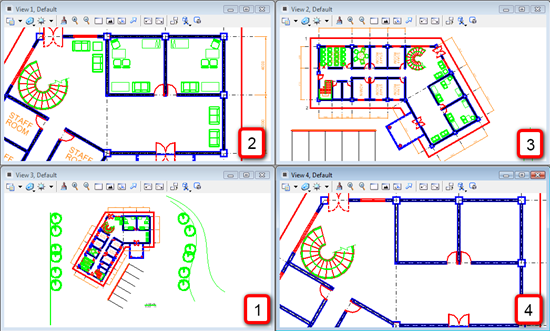
When we do a design in MicroStation, our design can be very large or complex. It will be very useful if we can open several views to see the design from different angle/perspective (for 3D) or simply open different views to show different areas. Imagine you have a very large area. Instead of zooming and […]
AutoCAD Precise Input: Specifying Point Coordinate
You have learned how to use AutoCAD drawing tools. When you activate an AutoCAD drawing tool, there are two possibilities what AutoCAD will ask you: options or specifying points. Some AutoCAD tools ask your confirmation for settings before asking you for a point. You will need to define points eventually. In this tutorial, we will […]
Creating Revit Family: Door
We have learned the basic of Revit families. You probably have found that creating Revit families is just a repetitive process. You create parameters, create a work plane, create a solid/void form, and create sketch. This time, we will create a door family. This door family will have solid and void forms, and you will […]
AutoCAD Installation Troubleshoot
A checklist to check why your AutoCAD installation failed.
- « Previous Page
- 1
- …
- 83
- 84
- 85
- 86
- 87
- …
- 105
- Next Page »


