We have created two building masses for design alternatives. We created the masses as Revit mass families which are saved as external files, not as in-placed families. Creating them as external families are good practice if you have design alternatives. We are going to see why. In this tutorial we are going to place it […]
AutoCAD WS mobile: take your DWGs anywhere on your mobile device!
If you have followed CAD Notes posts since early this year, you may already read about project Butterfly. Now the project is gone, come out from beta, and released as final application: AutoCAD WS and AutoCAD WS Mobile. There are some buzz about it last week, but in case you missed it or wondering what […]
How to: Select All Horizontal or Vertical Lines in a Drawing
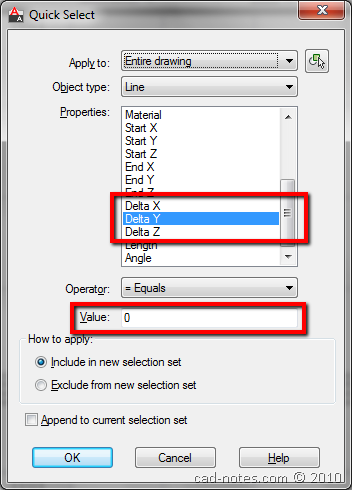
Do you need to select all vertical lines or all horizontal lines in AutoCAD drawings? Easy. You can use QSELECT!
How to: Keep Attributes at Dynamic Block Center
Do you like AutoCAD dynamic block? If you use stretch action, then the attributes will not stay at block center. Use this tip to keep at at center.
Modifying Revit Mass in X-Ray Mode
Let us continue the Revit conceptual design. We already cover a bit about Revit free form modeling in previous tutorial. This time, we are going to explore Revit free form further. Open your previous Revit mass family. Now save it as to different name. We will use the first mass as alternative design 1, and […]
Using Multiple Hyperlinks with Block Attributes
Do you need to add multiple hyperlinks in AutoCAD block? You can do it by using block attributes. See the tutorial here.
Free Form Modeling: Working with Sub Objects
Last week, we have cover a little about conceptual design. This time, let us talk a bit more about conceptual design: how we can work with free form modeling in Revit. This functionality added in Revit Architecture 2010. We can easily stretch faces, edges, or points to do free form modeling. This is quite nice […]
What is Similar Tool for Osnap Tracking in MicroStation?
What is similar tool for AutoCAD Osnap Tracking in MicroStation? Here is another problem for AutoCAD users. You may want create a drawing, start your drawing referenced to an existing point in your drawing. You can use Set Origin in AccuDraw shortcut. After you activate the tool, move the pointer over your reference point. Press […]
- « Previous Page
- 1
- …
- 74
- 75
- 76
- 77
- 78
- …
- 105
- Next Page »


