• Home
  • Training Books
  • Subscribe to Our Email Newsletter
  • About
    • Contributors
    • Feedback
    • Contact
    • Privacy policy
    • Cookie Policy

CADnotes

CAD Tutorials and Best Practices for professionals and students

  • Featured
  • AutoCAD
    • AutoLISP
  • Revit
    • Revit Architecture Basic
    • Revit MEP Basic Tutorial
  • Inventor
  • MicroStation
    • MicroStation Basic Tutorial
You are here: Home / AutoCAD / Set default system variables in acaddoc.lsp

Set default system variables in acaddoc.lsp

January 24, 2012 by Edwin Prakoso 1 Comment

In this Article...

Toggle
  • What can we do with acaddoc.lsp?
  • Common unexpected system variables change
  • We can force to set the variables in acaddoc.lsp
  • What system variables do you find change often?

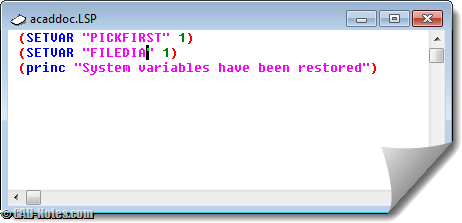
We covered about acaddoc.lsp in AutoLISP tutorial. Acaddoc.lsp will execute commands defined in it, every time AutoCAD open a file.
acaddoc

What can we do with acaddoc.lsp?

Now if you know you can run commands automatically when you open a file, what would you do?

  1. You can load AutoLISP file automatically.
  2. You can define new command. In the tutorial, we redefine PLOT command to update datalink before AutoCAD starts to plot.
  3. You can run commands before you start working with your file.
  4. You can set system variable before you start working.

In this article, we are going to focus to the last one. I found that there are many users confused why their AutoCAD doesn’t work as usual. And they become regular questions. These are some samples of changed system variables.

Common unexpected system variables change

These are several common system variables that change regularly.

  1. File dialog box is missing. You have to type file path and file name from command line. It’s because FILEDIA system variable has changed.
  2. AutoCAD default noun-verb selection becomes verb-noun selection. It’s because PICKFIRST system variable has changed.
  3. Single document interface is activated. It’s controlled by SDI system variable.
  4. And more…

There is a debate why they changed. Most people think that it was because routines in AutoLISP or other 3rd party applications. I used to be agree with it, until I saw this problem also happens in AutoCAD LT. So it remains a mystery to me.

We can force to set the variables in acaddoc.lsp

Harold Reuvers reminds me that we can set those variables in acaddoc.lsp. I prefer to backup my system variables and restore them when I have problem. We can’t remember all the variables, right?

However, if you have specific system variable that changes often, this is a good solution.

All you need is to create an acaddoc.lsp using notepad or visual LISP editor.

Just type these code:

(SETVAR "PICKFIRST" 1)

Feel free to add more lines or change system variables and values as you preferred.

If you want to learn how to use Visual LISP editor, see this basic AutoLISP tutorial.

What system variables do you find change often?

Do you find system variables in your AutoCAD change often? What are they?

Share the knowledge:

About Edwin Prakoso

I work as a Sr. Consultant in PT Cipta Satria Informatika. I've been using AutoCAD since R14 and Revit since Revit Building 9. I occasionally write for AUGIWorld magazine and I am also active in Autodesk discussion forum. I'm a member of Autodesk Expert Elite, an appreciation for individuals who give contributions to the Autodesk community.
Connect with me on twitter or LinkedIn.

Filed Under: AutoCAD, AutoLISP Tagged With: acaddoc.lsp, autocad tips, filedia, pickfirst

0 0 votes
Article Rating
Subscribe
Login
Notify of
guest

guest

This site uses Akismet to reduce spam. Learn how your comment data is processed.

1 Comment
DrCADD
DrCADD
13 years ago

AutoCAD 2013 System Variables Lookup Chart

0
Reply
wpdiscuz   wpDiscuz

Featured

Work Better with AutoCAD | challenge 7: Evaluate your progress

You have completed 6 challenges to work better with AutoCAD. Now it’s time to evaluate your progress after completing the challenges. Is there are any area that you can improve?

Recent Articles

  • Automation is not AI
  • BIM Doesn’t Fix Your Problems
  • BIM is Useful, Until It’s Not

Advertisement

New on CADnotes

  • Automation is not AI
  • BIM Doesn’t Fix Your Problems
  • BIM is Useful, Until It’s Not
  • AI-Powered Rendering Now Available in Forma Board
  • Autodesk Forma Is Not The New Name For ACC

Meet the Authors

avatar for
avatar for
avatar for
avatar for
avatar for
avatar for

Get Connected

CADnotes on FacebookCADnotes on InstagramCADnotes on TwitterCADnotes on YouTube

© 2009 – 2026 CADnotes · Feedback · Privacy Policy · Become an affiliate

In this Article...

×
  • What can we do with acaddoc.lsp?
  • Common unexpected system variables change
  • We can force to set the variables in acaddoc.lsp
  • What system variables do you find change often?
→ In this article...
wpDiscuz