• Home
  • Training Books
  • Subscribe to Our Email Newsletter
  • About
    • Contributors
    • Feedback
    • Contact
    • Privacy policy
    • Cookie Policy

CADnotes

CAD Tutorials and Best Practices for professionals and students

  • Featured
  • AutoCAD
    • AutoLISP
  • Revit
    • Revit Architecture Basic
    • Revit MEP Basic Tutorial
  • Inventor
  • MicroStation
    • MicroStation Basic Tutorial
You are here: Home / Revit / Older Revit Will Lose Access to Cloud Models

Older Revit Will Lose Access to Cloud Models

October 21, 2026 by Edwin Prakoso Leave a Comment

In this Article...

Toggle
  • What Changes on July 6, 2027
  • What to Do Before The Change
  • If You Can’t Upgrade Your Revit Version
  • The Bottom Line
  • References

Starting from July 6, 2027, Revit 2022 and older can no longer create or open Revit Cloud Models, including Revit Cloud Worksharing.
What Changes on July 6, 2027

  • Cloud access is limited to the current Revit release plus five previous versions.
  • About 90 days after each new Revit release, the oldest version drops.
  • Your data in the BIM 360 and Forma web apps, and local Revit work, are not affected.

You can see the schedule illustration below.
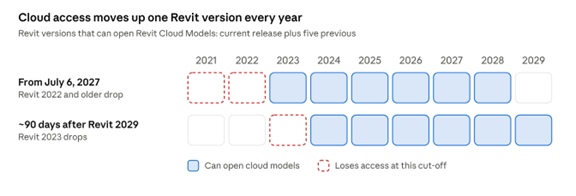
Each cut-off removes the oldest version from the window. It is recommended to upgrade to the latest version possible.

What to Do Before The Change

The most convenient way to upgrade cloud models is using Revit Cloud Model Upgrade tool.

  1. Find active projects on Revit 2022 or older, that use cloud models or cloud worksharing. Finished projects can be upgraded later when necessary, even after the cut-off.
  2. Agree on one target version with every firm on the project. Remember that upgrade can’t be undone. Autodesk recommends 2025 or newer.
  3. Run a Test Upgrade, then book the downtime as nobody can save or publish while the project upgrades.
  4. Check what the upgrade can’t process. Links through Desktop Connector and published copies in Design Collaboration or Bridge need upgrade from your computer.

If You Can’t Upgrade Your Revit Version

Download the cloud models and keep working locally in the same Revit version, without cloud collaboration (link files or local worksharing). Make the switch before July 6, 2027, while everyone can still sync.

The Bottom Line

The upgrade itself is a simple button click. The real work is coordination. For your next multi-year project, use the latest possible version if possible. One year before the latest release or latest release with at least has one update released is a common version to use.

References

If you need to find more details about this change, you can find them in the references below:

  • Changes to cloud model access due to deprecation of older versions in Revit (Autodesk Support, updated 19 Oct 2026)
  • Prepare for Revit Cloud Model Access Deprecation: Models Upgrade Process (Autodesk Support; covers workshared and non-workshared cloud models)
  • FAQ: Understanding Deprecation of Revit Cloud Models Access for Older Revit Versions (PDF, October 2026)
  • Cloud Models (Revit 2027 Help: Revit Cloud Worksharing vs Cloud Models for Revit)
  • How to check the Revit version of a Cloud project

Share the knowledge:

About Edwin Prakoso

I work as a Sr. Consultant in PT Cipta Satria Informatika. I've been using AutoCAD since R14 and Revit since Revit Building 9. I occasionally write for AUGIWorld magazine and I am also active in Autodesk discussion forum. I'm a member of Autodesk Expert Elite, an appreciation for individuals who give contributions to the Autodesk community.
Connect with me on twitter or LinkedIn.

Filed Under: Revit

0 0 votes
Article Rating
Subscribe
Login
Notify of
guest

guest

This site uses Akismet to reduce spam. Learn how your comment data is processed.

0 Comments

Featured

AutoCAD Script to Create Classic Workspace Automatically

Do you want to use AutoCAD Classic interface but the steps are difficult to follow? Just download this script and run it. It will create a Classic Workspace almost like magic!

Recent Articles

  • Older Revit Will Lose Access to Cloud Models
  • Automation is not AI
  • BIM Doesn’t Fix Your Problems

Advertisement

New on CADnotes

  • Older Revit Will Lose Access to Cloud Models
  • Automation is not AI
  • BIM Doesn’t Fix Your Problems
  • BIM is Useful, Until It’s Not
  • AI-Powered Rendering Now Available in Forma Board

Meet the Authors

avatar for
avatar for
avatar for
avatar for
avatar for
avatar for

Get Connected

CADnotes on FacebookCADnotes on InstagramCADnotes on TwitterCADnotes on YouTube

© 2009 – 2026 CADnotes · Feedback · Privacy Policy · Become an affiliate

In this Article...

×
  • What Changes on July 6, 2027
  • What to Do Before The Change
  • If You Can’t Upgrade Your Revit Version
  • The Bottom Line
  • References
→ In this article...
wpDiscuz