• Home
  • Training Books
  • Subscribe to Our Email Newsletter
  • About
    • Contributors
    • Feedback
    • Contact
    • Privacy policy
    • Cookie Policy
  • Bahasa Indonesia

CADnotes

CAD Tutorials and Best Practices for professionals and students

  • Featured
  • AutoCAD
    • AutoLISP
  • Revit
    • Revit Architecture Basic
    • Revit MEP Basic Tutorial
  • Inventor
  • MicroStation
    • MicroStation Basic Tutorial

AutoCAD 2012: NCOPY and OVERKILL are graduated from express tools

April 6, 2011 by Edwin Prakoso 3 Comments

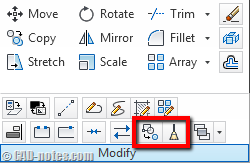
Two express tools are graduated and become AutoCAD and AutoCAD LT built-in command. Yes, AutoCAD LT users can use NCOPY and OVERKILL now!

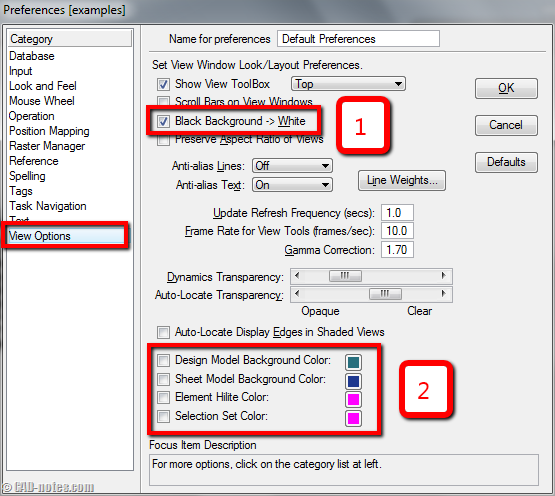
MicroStation tip: change view background color and pointer size
April 5, 2011 by Edwin Prakoso 6 Comments

Do you want to change MicroStation view background? Or do you prefer to have full sized pointer/crosshair? See how you can do it in MicroStation here.

AutoCAD 2012: Inventor Fusion and AutoCAD WS plugin are now in the box

April 4, 2011 by Edwin Prakoso 2 Comments

Now we have two Autodesk products in AutoCAD box. Fusion extends the 3D modeling capabilities. AutoCAD WS allows you to collaborate with your partners online!

AutoCAD 2012: Object selection improvements

March 30, 2011 by Edwin Prakoso 3 Comments

Object selection in AutoCAD 2012 is also improved. There are several new enhancements to allow you select objects easier. So you can have more than 10 ways to select objects now. PICKDRAG and PICKAUTO There are two new variables in object selection. This may not how AutoCAD users usually do to select objects, but it […]

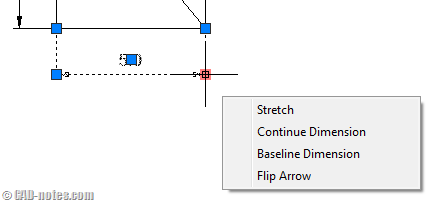
AutoCAD 2012 minor modification enhancement: grip and nudge
March 29, 2011 by Edwin Prakoso Leave a Comment

Here are more minor AutoCAD 2012 enhancement. Now we have more options for grips. New nudge command is also available.

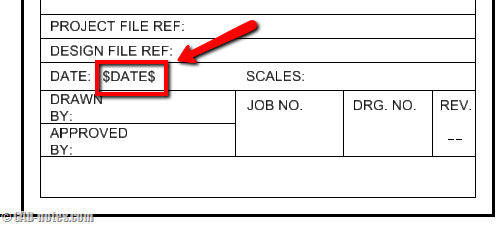
MicroStation tip: Create automatic plot date in title block
March 25, 2011 by Edwin Prakoso 1 Comment

Need to show plot date information in title block? We can do that in MicroStation using pen table. See how you can do it here.

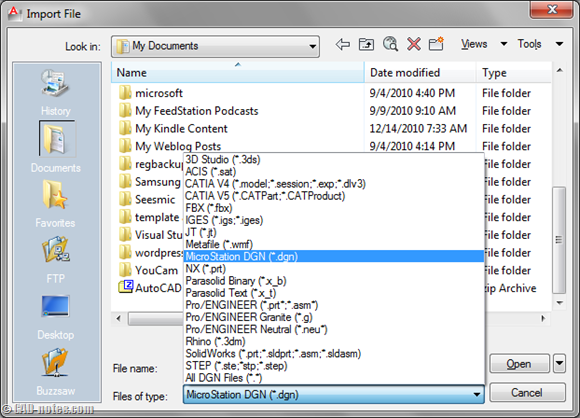
AutoCAD 2012: Ability to import most manufacturing files
March 25, 2011 by Edwin Prakoso 2 Comments

There are so many new capabilities in AutoCAD 2012. They are not really new, have been there for years, but we just have it in AutoCAD. If you go out there and talk to fellow AutoCAD users, they will be excited too. But if you talk associative array to Inventor users, they won’t think it’s […]

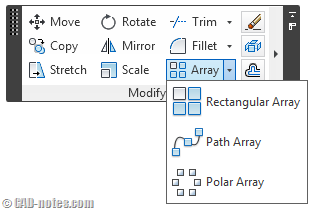
AutoCAD 2012: new array commands
March 24, 2011 by Edwin Prakoso 10 Comments

Array in AutoCAD 2012 is a huge change. You can see Steve Johnson opinion about array in AutoCAD 2012 here. In my opinion the biggest changes are: Associativity It’s now associative object. We can edit the settings anytime easily. The best thing about it is, now we can use parameter in it. See later (at […]

  • « Previous Page
  • 1
  • …
  • 66
  • 67
  • 68
  • 69
  • 70
  • …
  • 105
  • Next Page »

Featured

6 Things AutoCAD Command Line Can Do for You (Infographics)

AutoCAD Command Line is the most important feature in AutoCAD. Veteran users can use two hands (one on the keyboard and the other using mouse) and draw very quickly. It is faster than relying on the GUI only.

The new users probably using GUI more than older users like me. They prefer the Ribbon and use the Command Line less. 

In this post, you can see 6 things AutoCAD Command Line can do to make your life easier. You don’t have to use them all, but at least you know it can be done. If you think it’s good, use it. But if you don’t like it, leave it.

Recent Articles

  • Placing Views on Sheet Efficiently with Saved Position
  • Autodesk Forma: One Platform to Rule the AEC Lifecycle
  • Accessing Autodesk Docs Files from Windows Explorer

Advertisement

New on CADnotes

  • Placing Views on Sheet Efficiently with Saved Position
  • Autodesk Forma: One Platform to Rule the AEC Lifecycle
  • Accessing Autodesk Docs Files from Windows Explorer
  • The Evolution of BIM: From 3D Models to Information Management
  • The Misconception of CAD to BIM

Meet the Authors

avatar for
avatar for
avatar for
avatar for
avatar for
avatar for

Get Connected

CADnotes on FacebookCADnotes on InstagramCADnotes on TwitterCADnotes on YouTube

© 2009 – 2026 CADnotes · Feedback · Privacy Policy · Become an affiliate