• Home
  • Training Books
  • Subscribe to Our Email Newsletter
  • About
    • Contributors
    • Feedback
    • Contact
    • Privacy policy
    • Cookie Policy

CADnotes

CAD Tutorials and Best Practices for professionals and students

  • Featured
  • AutoCAD
    • AutoLISP
  • Revit
    • Revit Architecture Basic
    • Revit MEP Basic Tutorial
  • Inventor
  • MicroStation
    • MicroStation Basic Tutorial
You are here: Home / AutoCAD / Keep AutoCAD block layer after exploding

Keep AutoCAD block layer after exploding

June 20, 2012 by Edwin Prakoso 2 Comments

In this Article...

Toggle
  • It’s not just attribute values
    • It also keep layer

You probably already know about BURST command. BURST is an express tool that can keep attribute value after you explode a block. ‘Normal’ explode will convert block to default state and remove values that you’ve given.
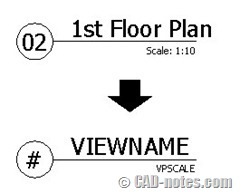
explode block

Using BURST will keep the value.

It’s not just attribute values

Autodesk name it explode attributes. So I think it was designed for attributes. But apparently it’s not the only one that it can keep.
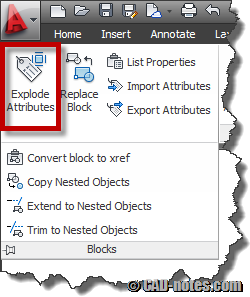
burst explode attributes

It also keep layer

Let’s say you created elements in block using ByLayer. When you place it in a drawing, it will use active layer properties. If you move it to other layer, then it will also use that layer properties.

But what happened if you explode that block? All elements will be back to layer 0.

The interesting thing is if you use BURST, it will still use layer where the block is placed.

I think BURST might be able to keep more than layers and attributes. Do you know what else it can keep?

Share the knowledge:

About Edwin Prakoso

I work as a Sr. Consultant in PT Cipta Satria Informatika. I've been using AutoCAD since R14 and Revit since Revit Building 9. I occasionally write for AUGIWorld magazine and I am also active in Autodesk discussion forum. I'm a member of Autodesk Expert Elite, an appreciation for individuals who give contributions to the Autodesk community.
Connect with me on twitter or LinkedIn.

Filed Under: AutoCAD Tagged With: attribute, autocad tips, block, BURST, layer

0 0 votes
Article Rating
Subscribe
Login
Notify of
guest

guest

This site uses Akismet to reduce spam. Learn how your comment data is processed.

2 Comments
Jim Anderson
Jim Anderson
14 years ago

Xplode is an express tool which has been incorporated in the core commands, so it is available to LT users as well. You can choose to explode an object & inherit it's layers as well.

0
Reply
Edwin Prakoso
Edwin Prakoso
Reply to  Jim Anderson
14 years ago

Thank you Jim! I've never used XPLODE before. Looks like more appropriate tool to do the job!

0
Reply
wpdiscuz   wpDiscuz

Featured

What’s New in Revit 2021 – Part 3: Structure

See what’s new in Revit 2021 in structural discipline. We have some exciting enhancements in this area!

Recent Articles

  • AI Is an Assistant, Not a Replacement
  • Open Large Revit Models Faster: Incremental Model Open
  • 10 AutoCAD Commands Only Veterans Know

Advertisement

New on CADnotes

  • AI Is an Assistant, Not a Replacement
  • Open Large Revit Models Faster: Incremental Model Open
  • 10 AutoCAD Commands Only Veterans Know
  • Is Your Revit Model Healthy?
  • Older Revit Will Lose Access to Cloud Models

Tags

360 annotation scaling AutoCAD autocad 3D AutoCAD 2011 AutoCAD 2012 AutoCAD 2013 AutoCAD 2014 AutoCAD 2015 AutoCAD 2016 AutoCAD Basic Series autocad tips AutoCAD troubleshoots AutoCAD WS Autodesk 360 autolisp block command line cui cui tutorial customization dimension dimension styles DWG dynamic block dynamic block tutorial Hatch hotfix layer macro MicroStation Basic MicroStation Tips rendering material Revit 2023 Revit Architecture Basic Revit MEP Basic Revit what's new service pack system variable template tool palettes view viewport WBWA2014 xref

Sharing is Caring

© 2009 – 2026 CADnotes · Feedback · Privacy Policy · Become an affiliate

In this Article...

×
  • It’s not just attribute values
    • It also keep layer
→ In this article...
wpDiscuz