• Home
  • Training Books
  • Subscribe to Our Email Newsletter
  • About
    • Contributors
    • Feedback
    • Contact
    • Privacy policy
    • Cookie Policy
  • Bahasa Indonesia

CADnotes

CAD Tutorials and Best Practices for professionals and students

  • Featured
  • AutoCAD
    • AutoLISP
  • Revit
    • Revit Architecture Basic
    • Revit MEP Basic Tutorial
  • Inventor
  • MicroStation
    • MicroStation Basic Tutorial

4 Reasons to Love AutoCAD Dynamic Input
June 5, 2009 by Edwin Prakoso 4 Comments

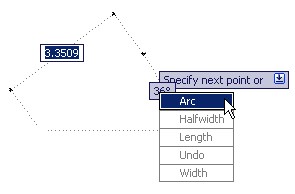
Don’t like AutoCAD Dynamic Input? There are some advantages of using it. You may love it after you know them!

Using AutoCAD LAYWALK to Check Objects Layers
June 4, 2009 by Edwin Prakoso 2 Comments

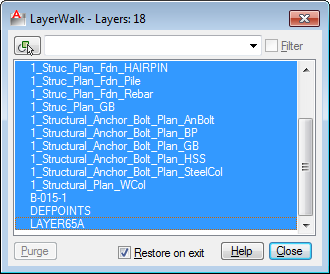
Working with many AutoCAD layers? Need to check if your objects are placed in correct layer quickly? With Layer Walk you can do it visually, quickly.

AutoCAD Match Properties Settings
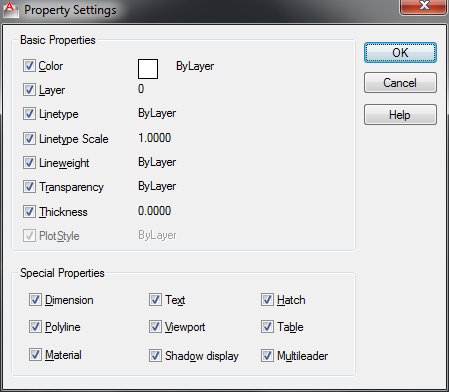
June 3, 2009 by Edwin Prakoso 5 Comments

Do you know that you can match selective properties in AutoCAD drawings? MATCHPROP is not only to match all properties, you can selectively select the properties to match!

AutoCAD Startup Dialog Box

June 3, 2009 by Edwin Prakoso 3 Comments

Do you want to let users to choose template when start AutoCAD? Or do you want AutoCAD to start without loading any file? Read here for details!

When AutoCAD is not Accurate
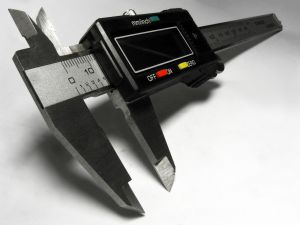
June 2, 2009 by Edwin Prakoso

If you happen to find AutoCAD is not accurate, you can check if the drawing is too far from 0,0 coordinate. It’s very rare, but I find that it is possible to happen.

6 SHIFT Key Combination You Might Not Know

June 1, 2009 by Edwin Prakoso 15 Comments

AutoCAD has several key combinations that will help you to access more options/tools easily. This article has 6 shift key combinations that you can use!

Quickly create palettes from block libraries

June 1, 2009 by Edwin Prakoso Leave a Comment

create tool palette context menu

Do you have many block libraries? Do you want to quickly create tool palettes with a few click? Read how to do it here!

Creating Your Own AutoCAD Line Type

May 29, 2009 by Edwin Prakoso 46 Comments

Do you need a custom AutoCAD line type? You can create it easily using express tools. Let’s see how easy to make it!

  • « Previous Page
  • 1
  • …
  • 102
  • 103
  • 104

Featured

Why you should use AutoCAD blocks

AutoCAD blocks can increase your productivity significantly. See why you should use block and optimize your blocks library to help your productivity here. Not only reduce boring repetitive tasks, it can also make your drawing smarter!

Recent Articles

  • Accessing Autodesk Docs Files from Windows Explorer
  • The Evolution of BIM: From 3D Models to Information Management
  • The Misconception of CAD to BIM

Advertisement

New on CADnotes

  • Accessing Autodesk Docs Files from Windows Explorer
  • The Evolution of BIM: From 3D Models to Information Management
  • The Misconception of CAD to BIM
  • Revit Pattern Alignment
  • Why BIM Dimensions (3D, 4D, 5D) Are No Longer Relevant

Meet the Authors

avatar for
avatar for
avatar for
avatar for
avatar for
avatar for

Get Connected

CADnotes on FacebookCADnotes on InstagramCADnotes on TwitterCADnotes on YouTube

© 2009 – 2026 CADnotes · Feedback · Privacy Policy · Become an affiliate