• Home
  • Training Books
  • Subscribe to Our Email Newsletter
  • About
    • Contributors
    • Feedback
    • Contact
    • Privacy policy
    • Cookie Policy

CADnotes

CAD Tutorials and Best Practices for professionals and students

  • Featured
  • AutoCAD
    • AutoLISP
  • Revit
    • Revit Architecture Basic
    • Revit MEP Basic Tutorial
  • Inventor
  • MicroStation
    • MicroStation Basic Tutorial
You are here: Home / AutoCAD / Import Objects and Styles from Other AutoCAD Drawings

Import Objects and Styles from Other AutoCAD Drawings

February 14, 2011 by Edwin Prakoso 4 Comments

Have you used AutoCAD Design Center to import styles and objects from other drawings? It is a very good tool. But today I stumbled to this program created by Lee Mac: Steal.

It is a very good alternative if you find that AutoCAD Design Center can provide what you want. It gives you more options to import (or steal, as he said :)
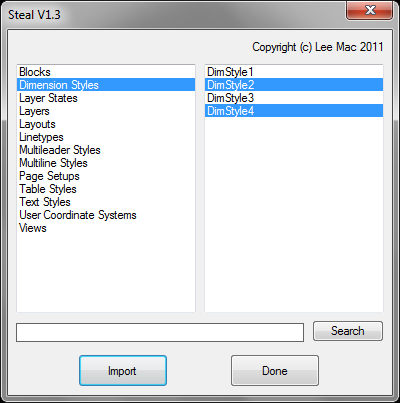
Steal

So what are AutoCAD objects and styles can be imported?

  • Blocks
  • Layers
  • Linetypes
  • Dimension Style
  • Text Styles
  • Table Styles
  • MLeader Style
  • MLine Style
  • Layouts
  • Page Setups
  • User Coordinate Systems
  • Views
  • Layer States

Pretty cool, isn’t it? If you want to give it a try, you can download it from this thread on CAD Tutor. Lee created many great LISP program. If you want to take a look what he has done, go to this program page on his site.

Happy stealing!

Share the knowledge:

About Edwin Prakoso

I work as a Sr. Consultant in PT Cipta Satria Informatika. I've been using AutoCAD since R14 and Revit since Revit Building 9. I occasionally write for AUGIWorld magazine and I am also active in Autodesk discussion forum. I'm a member of Autodesk Expert Elite, an appreciation for individuals who give contributions to the Autodesk community.
Connect with me on twitter or LinkedIn.

Filed Under: AutoCAD Tagged With: AutoLISP program

0 0 votes
Article Rating
Subscribe
Login
Notify of
guest

guest

This site uses Akismet to reduce spam. Learn how your comment data is processed.

4 Comments
ripvanwinkle
ripvanwinkle
13 years ago

where does the program store the stolen info. once i type steal2 or steal all the program runs and then nothing really happens. i picked a drawing i want to use as a reference to take blocks from?

0
Reply
winko
winko
15 years ago

I have downloaded stealV1-3.lsp. But I don't know how to use. Please help me.

0
Reply
Edwin Prakoso
Edwin Prakoso
Author
Reply to  winko
15 years ago

Winko,
You need to load the lisp application first.
Type APPLOAD from command line, then choose the lisp file.
After it's loaded, type STEAL in your command line to activate it.

0
Reply
winko
winko
Reply to  Edwin Prakoso
15 years ago

Thanks Edwin, I got it.

0
Reply
wpdiscuz   wpDiscuz

Featured

6 Things AutoCAD Command Line Can Do for You (Infographics)

AutoCAD Command Line is the most important feature in AutoCAD. Veteran users can use two hands (one on the keyboard and the other using mouse) and draw very quickly. It is faster than relying on the GUI only.

The new users probably using GUI more than older users like me. They prefer the Ribbon and use the Command Line less. 

In this post, you can see 6 things AutoCAD Command Line can do to make your life easier. You don’t have to use them all, but at least you know it can be done. If you think it’s good, use it. But if you don’t like it, leave it.

Recent Articles

  • BIM Doesn’t Fix Your Problems
  • BIM is Useful, Until It’s Not
  • AI-Powered Rendering Now Available in Forma Board

Advertisement

New on CADnotes

  • BIM Doesn’t Fix Your Problems
  • BIM is Useful, Until It’s Not
  • AI-Powered Rendering Now Available in Forma Board
  • Autodesk Forma Is Not The New Name For ACC
  • Placing Views on Sheet Efficiently with Saved Position

Meet the Authors

avatar for
avatar for
avatar for
avatar for
avatar for
avatar for

Get Connected

CADnotes on FacebookCADnotes on InstagramCADnotes on TwitterCADnotes on YouTube

© 2009 – 2026 CADnotes · Feedback · Privacy Policy · Become an affiliate

wpDiscuz