Do you use AutoCAD ribbon? One annoying thing about AutoCAD ribbon for me is when I have to work with low screen resolution. I do set it quite high on my computer and feel comfortable with it. However, when I have to do presentations, sometimes I have to set my screen resolution to 1024×768 pixels, because the projector doesn’t support higher resolution. When I work with AutoCAD in such a low resolution, I often loose it. I don’t know which tool is in which panel, because the panel is collapsed and hide the tools!
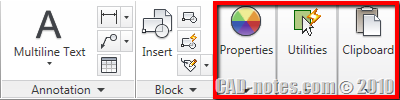
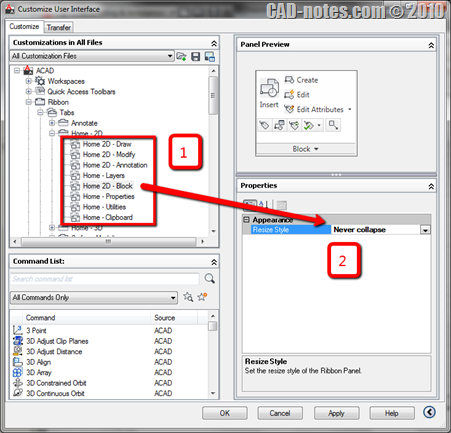
I found a workaround to keep my favorite panel from collapsing. Go to customer user interface by typing CUI then [enter].
Expand the ribbon> tabs. You will find the ribbon tabs categories here. Let’s say I don’t want my block panel to collapse. So I expand Home – 2D tab. I select the Home 2D – Block panel. In panel properties, I changed the resize style to never collapse.
Click OK to close CUI dialog box.
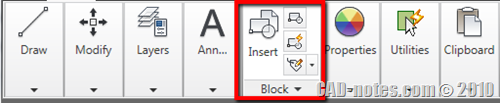
Now try to resize AutoCAD window. As you can see, even all of the panels are collapsed, the block panel is still expanded!
Sticky Panels
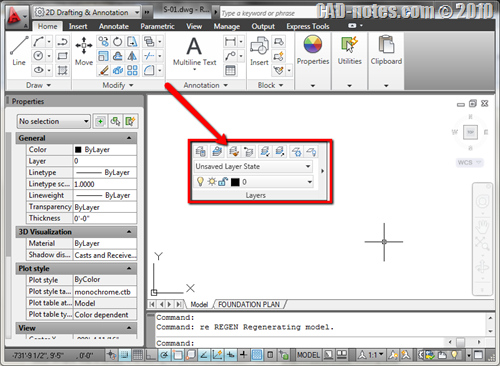
Other simpler way to do this is by tearing the panels from the ribbon. You can drag the panel to your drawing area, just like toolbars.


Hi,
How do a retrieve my AutoCAD 2011 Ribbon Panels? I accidentally clicked something and it disappeared and I can't seem to find a default setting to bring it back.
Have you tried to switch workspace to 2D and drafting? If it doesn't work, have you tried to reset your AutoCAD profile?