Did you ever explode AutoCAD block that contains attributes? We use the command to convert your AutoCAD objects to its basic component. We can convert it back to lines, text, and other basic objects.
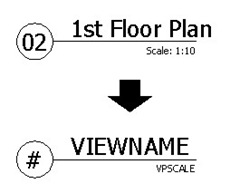
But after exploding, you will see the attributes will lose all the data you have given. It will show the attribute tag instead. It is just like the first time you create the objects. So, how can you keep the data in your attributes?

Try to use BURST! It works just as explode, but preserve your attributes value.
Command: BURST
Initializing…
Select objects: 1 found
It will convert the block to the basic component, but you will not lose data.
However, BURST is a part of express tools. You need to have it installed to use it. If you use version 2010 or later, it should be part of default installation. But if you use an older version, this article may help you to install express tools.


How can i remove the union or seperate two blocks(solids) except UNDO method.
Using explode command it converts into faces.
I like the look at feel of your site. Modern, uncluttered and carrying a tone of trustworthiness.
Thanks for all your tutorials. Please replace loose with lose for this article.
Thanks again for sharing your knowledge.
Thank you Johann,
I replaced the word. Sorry for my poor grammar :)
and of course LT users … no BURST for you !!!
Yes,
Unfortunately because this is a part of express tools, it's not available in AutoCAD LT :(