
• Home
  • Training Books
  • Subscribe to Our Email Newsletter
  • About
    • Contributors
    • Feedback
    • Contact
    • Privacy policy
    • Cookie Policy

CADnotes

CAD Tutorials and Best Practices for professionals and students

  • Featured
  • AutoCAD
    • AutoLISP
  • Revit
    • Revit Architecture Basic
    • Revit MEP Basic Tutorial
  • Inventor
  • MicroStation
    • MicroStation Basic Tutorial

Create a custom AutoCAD secondary command to work faster

September 30, 2015 by Edwin Prakoso 10 Comments

Do you need to change a setting when working with AutoCAD command? Why not create a secondary command so you can work faster!

12 settings I’ve changed in AutoCAD 2015 already!

February 25, 2015 by Paul Munford 21 Comments

We all have our own preference in AutoCAD. Paul Munford shares his preferred settings after he installed AutoCAD 2015. You might learn something new to increase your productivity!

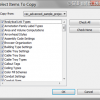
How to copy Revit project settings to other projects
September 24, 2014 by Edwin Prakoso Leave a Comment

Do you need to copy a Revit project settings to other project? This tool can help you.

Featured

Sharing files and designs with Autodesk 360

If you have Autodesk account, you can have free 5GB online storage. You can use it to share large files or provide 3D viewers. You can showcase your design on your company website or your personal portfolio!

Recent Articles

  • BIM is Useful, Until It’s Not
  • AI-Powered Rendering Now Available in Forma Board
  • Autodesk Forma Is Not The New Name For ACC

Advertisement

New on CADnotes

  • BIM is Useful, Until It’s Not
  • AI-Powered Rendering Now Available in Forma Board
  • Autodesk Forma Is Not The New Name For ACC
  • Placing Views on Sheet Efficiently with Saved Position
  • Autodesk Forma: One Platform to Rule the AEC Lifecycle

Meet the Authors

avatar for
avatar for
avatar for
avatar for
avatar for
avatar for

Get Connected

CADnotes on FacebookCADnotes on InstagramCADnotes on TwitterCADnotes on YouTube

© 2009 – 2026 CADnotes · Feedback · Privacy Policy · Become an affiliate