• Home
  • Training Books
  • Subscribe to Our Email Newsletter
  • About
    • Contributors
    • Feedback
    • Contact
    • Privacy policy
    • Cookie Policy

CADnotes

CAD Tutorials and Best Practices for professionals and students

  • Featured
  • AutoCAD
    • AutoLISP
  • Revit
    • Revit Architecture Basic
    • Revit MEP Basic Tutorial
  • Inventor
  • MicroStation
    • MicroStation Basic Tutorial

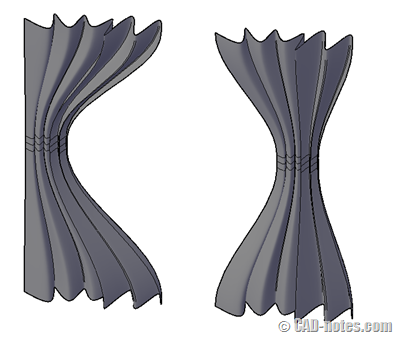
AutoCAD tip: modeling a curtain

June 28, 2012 by Edwin Prakoso 2 Comments

Do you want to create a 3D curtain in AutoCAD quickly? Here are a quick steps you can follow!

Featured

How to: Selectively Select Objects in Revit

Revit model usually is not as complicated as an AutoCAD drawing. You can select objects easier before you modify it. However, in a complex model, you need a method to select multiple objects faster. You want to select them based on specific properties. For example, you want to select all walls with a specific type. Or you want to select all walls with a specific function.
We cover different methods in this article that you can use.

Recent Articles

  • Older Revit Will Lose Access to Cloud Models
  • Automation is not AI
  • BIM Doesn’t Fix Your Problems

Advertisement

New on CADnotes

  • Older Revit Will Lose Access to Cloud Models
  • Automation is not AI
  • BIM Doesn’t Fix Your Problems
  • BIM is Useful, Until It’s Not
  • AI-Powered Rendering Now Available in Forma Board

Meet the Authors

avatar for
avatar for
avatar for
avatar for
avatar for
avatar for

Get Connected

CADnotes on FacebookCADnotes on InstagramCADnotes on TwitterCADnotes on YouTube

© 2009 – 2026 CADnotes · Feedback · Privacy Policy · Become an affiliate