Image source: Shaan Hurley Flickr Album I have been using AutoCAD since R.13. I heard many people don’t like that release, but it looks fine for me :). I use almost every release of AutoCAD since then. Some are not for so long, but at least I get how they look and feel. There are […]
What is Your Favorite AutoCAD/Revit/MicroStation Tip?

This time, I’m asking your help to submit your favorite tips of all time. You can submit tips about AutoCAD, Revit, or MicroStation here. The purpose is to create 3 lists: ‘xx greatest tips’ for those 3 applications. ‘50 AutoCAD Greatest Tips’ sounds great, isn’t it? I believe we will see some great tips […]
AutoCAD Performs Incorrect Calculation
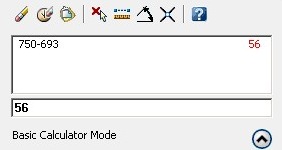
My friend notify me about this bug a couple days ago. He mention that when we use the QUICKCALC (or CAL) command, AutoCAD returns incorrect value. This is a bug. Try to calculate 750-693. You may see it returns incorrect value. I got 56. There are some more incorrect results. Yesterday, VMichl notify me that […]
Autodesk Products Issue when Norton Installed

I found two issues lately. My customer have problem with their AutoCAD 2008 after they install Norton 360. Lucky for him, Symantec provide a hotfix for this issue. Later another customer have problem with their Inventor 2010. It was Norton Internet Security that cause this. This is an old issue, since Inventor 11. But it […]
When It’s Freeze, It’s Not Always AutoCAD Fault!

Last week, I had troubleshoot inquiry from my company customer (I work for an AutoCAD reseller) After he’s doing some system upgrades, then suddenly his AutoCAD always freeze when he tried to create a new file, or using save as command. He use AutoCAD LT 2008. He’s been using it for 2 years without a […]
Enable Network License Service Behind Firewall

Another troubleshoot on network license using flexlm. If you are using LM Tools/flexlm, you might found your client workstation cannot find the license service. When you perform status enquiry, you see your license server is actually running. When you check on your client workstation, it can access your server. What’s wrong? I found this problem […]
How to: Combine Your License File

I found this problem when I installed AutoCAD and Civil3D network license on the same license server. As we know, Autodesk use Flexlm to manage license on server. I can’t make them both work! In flexlm, if I started AutoCAD license service first, then Civil3D service won’t start. And vice versa. I saw in the […]
- « Previous Page
- 1
- …
- 10
- 11
- 12


