• Home
  • Training Books
  • Subscribe to Our Email Newsletter
  • About
    • Contributors
    • Feedback
    • Contact
    • Privacy policy
    • Cookie Policy

CADnotes

CAD Tutorials and Best Practices for professionals and students

  • Featured
  • AutoCAD
    • AutoLISP
  • Revit
    • Revit Architecture Basic
    • Revit MEP Basic Tutorial
  • Inventor
  • MicroStation
    • MicroStation Basic Tutorial
You are here: Home / Archive / AutoCAD 2012: Legacy Snap to Grid

AutoCAD 2012: Legacy Snap to Grid

September 8, 2011 by Edwin Prakoso 1 Comment

Just a quick additional information.

I posted about ‘the array dialog box returns’. Apparently there is one more classic feature returns in AutoCAD 2012.

In AutoCAD 2012, snap to grid is automatically disabled when AutoCAD is not asking for a coordinate input. It was one of object selection improvements in AutoCAD 2012.

However, I’ve seen people asking to always enable snap to grid back.

You can have it back by changing SNAPGRIDLEGACY
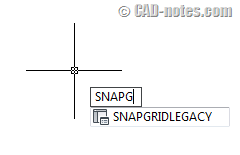
legacy_snap_to_grid

SNAPGRIDLEGACY
1 – Always snap the cursor to the grid
0 – Only snap the cursor to the grid when AutoCAD prompts to specify a point

Change it to 1, then snap to grid will always active.

I’m sorry to miss it. Thank you to Kate Morrical for mentioning it in her blog post.

Remember to install AutoCAD 2012 service pack 1 to get this feature.

Share the knowledge:

About Edwin Prakoso

I work as a Sr. Consultant in PT Cipta Satria Informatika. I've been using AutoCAD since R14 and Revit since Revit Building 9. I occasionally write for AUGIWorld magazine and I am also active in Autodesk discussion forum. I'm a member of Autodesk Expert Elite, an appreciation for individuals who give contributions to the Autodesk community.
Connect with me on twitter or LinkedIn.

Filed Under: Archive Tagged With: snap to grid

0 0 votes
Article Rating
Subscribe
Login
Notify of
guest

guest

This site uses Akismet to reduce spam. Learn how your comment data is processed.

1 Comment
Jen
Jen
13 years ago

In my AutoCadd the command is SNAPMODE. I changed it to 0 and it worked! Thanks!

0
Reply
wpdiscuz   wpDiscuz

Featured

Autodesk Construction Cloud Evolution

Autodesk Construction Cloud (ACC) represents the evolution of Autodesk’s CDE, from the fragmented BIM 360 Classic, through BIM 360 Next Gen with centralized file storage, to the fully integrated Unified Platform. Read the Autodesk Construction Cloud evolution in this post!

Recent Articles

  • BIM Doesn’t Fix Your Problems
  • BIM is Useful, Until It’s Not
  • AI-Powered Rendering Now Available in Forma Board

Advertisement

New on CADnotes

  • BIM Doesn’t Fix Your Problems
  • BIM is Useful, Until It’s Not
  • AI-Powered Rendering Now Available in Forma Board
  • Autodesk Forma Is Not The New Name For ACC
  • Placing Views on Sheet Efficiently with Saved Position

Meet the Authors

avatar for
avatar for
avatar for
avatar for
avatar for
avatar for

Get Connected

CADnotes on FacebookCADnotes on InstagramCADnotes on TwitterCADnotes on YouTube

© 2009 – 2026 CADnotes · Feedback · Privacy Policy · Become an affiliate

wpDiscuz