• Home
  • Training Books
  • Subscribe to Our Email Newsletter
  • About
    • Contributors
    • Feedback
    • Contact
    • Privacy policy
    • Cookie Policy

CADnotes

CAD Tutorials and Best Practices for professionals and students

  • Featured
  • AutoCAD
    • AutoLISP
  • Revit
    • Revit Architecture Basic
    • Revit MEP Basic Tutorial
  • Inventor
  • MicroStation
    • MicroStation Basic Tutorial
You are here: Home / Archive / Project Neon now support Revit 2012!

Project Neon now support Revit 2012!

June 16, 2011 by Edwin Prakoso Leave a Comment

In this Article...

Toggle
  • It doesn’t take a long time anymore
  • How to do it in Revit?
  • Walkthrough Animation
  • Availability

“Does Revit rendering time always that long?” He looked at me with his desperate eyes.

“ I render my model one day before I went to presentation, but it didn’t finish when I need it…” He continued his murmur.

It was about 5 years ago. Revit still uses AccuRender at that time. And yes, it took very long time to create just a descent result.

It doesn’t take a long time anymore

I believe he will be very happy if he read this. If you already knew Project Neon, then you will be happy too to know that it supports Revit file now!
Project_Neon

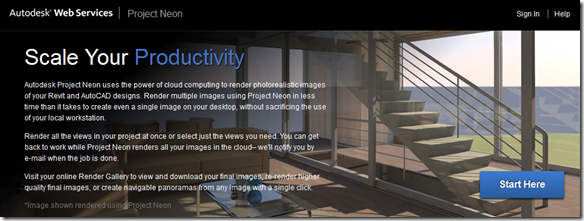
Project Neon is an online rendering service from Autodesk. You can upload your AutoCAD (and now Revit!) model and let their servers render it for you. At the moment, they use 8 machines, 4 cores each to do the job. So yes, it’s very fast compared to your machine.

You don’t have to create your own render farm just to get the work done. You don’t even need to purchase high performance computer to do rendering. Leave it to Project Neon.

How to do it in Revit?

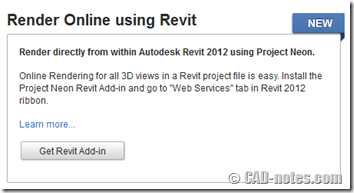
Rendering your Revit model on Project Neon is unbelievably easier than AutoCAD. You can download a plugin on Project Neon website then install it.
Revit_Add-in

The plugin will add one more tab on your ribbon: web services. You can upload your opened file and choose which views to render.

You can see the detailed demonstration on YouTube here.

When I tried to render the provided samples, it only took a few minutes to render 4 views!

Walkthrough Animation

If you’re wondering if it supports walkthrough rendering, then that make two of us.

One thing that a bit disappointing is, it doesn’t support creating walkthrough animation yet. Probably because it still a technology preview. I expect that they will provide it one day.

Availability

According to the labs blog, Project Neon is available as technology preview until 27 September 2011. I’m not sure how Autodesk will provide it to their customers after that date. It may be still free, only available for subscription customers, or probably using other pricing schemes.

Now that it’s still available for free, go ahead and try it. Torture the servers!

Share the knowledge:

About Edwin Prakoso

I work as a Sr. Consultant in PT Cipta Satria Informatika. I've been using AutoCAD since R14 and Revit since Revit Building 9. I occasionally write for AUGIWorld magazine and I am also active in Autodesk discussion forum. I'm a member of Autodesk Expert Elite, an appreciation for individuals who give contributions to the Autodesk community.
Connect with me on twitter or LinkedIn.

Filed Under: Archive Tagged With: Project Neon, rendering, Revit 2012, web service

0 0 votes
Article Rating
Subscribe
Login
Notify of
guest

guest

This site uses Akismet to reduce spam. Learn how your comment data is processed.

0 Comments

Featured

Complete our challenges to work better with AutoCAD!

Learning AutoCAD is not only about knowing all the features. You need to know to to work effectively with it, and they don’t teach it in school or training classes. You can learn with us here!

Recent Articles

  • Automation is not AI
  • BIM Doesn’t Fix Your Problems
  • BIM is Useful, Until It’s Not

Advertisement

New on CADnotes

  • Automation is not AI
  • BIM Doesn’t Fix Your Problems
  • BIM is Useful, Until It’s Not
  • AI-Powered Rendering Now Available in Forma Board
  • Autodesk Forma Is Not The New Name For ACC

Meet the Authors

avatar for
avatar for
avatar for
avatar for
avatar for
avatar for

Get Connected

CADnotes on FacebookCADnotes on InstagramCADnotes on TwitterCADnotes on YouTube

© 2009 – 2026 CADnotes · Feedback · Privacy Policy · Become an affiliate

In this Article...

×
  • It doesn’t take a long time anymore
  • How to do it in Revit?
  • Walkthrough Animation
  • Availability
→ In this article...
wpDiscuz