• Home
  • Training Books
  • Subscribe to Our Email Newsletter
  • About
    • Contributors
    • Feedback
    • Contact
    • Privacy policy
    • Cookie Policy

CADnotes

CAD Tutorials and Best Practices for professionals and students

  • Featured
  • AutoCAD
    • AutoLISP
  • Revit
    • Revit Architecture Basic
    • Revit MEP Basic Tutorial
  • Inventor
  • MicroStation
    • MicroStation Basic Tutorial

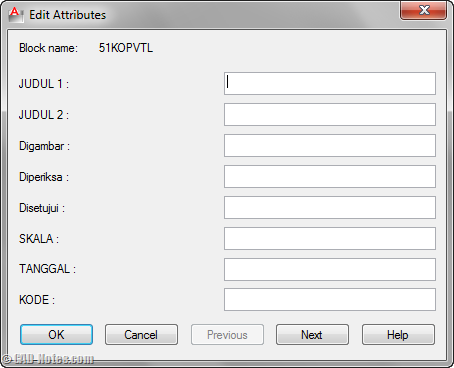
Enable block attribute dialog during insertion

June 8, 2011 by Edwin Prakoso 1 Comment

Do you have blocks with many attributes? Do you ever wish you can input the value easier than typing in command line? See how to do it by changing a system variable.

Showing Common AutoCAD Information in Title Block
December 11, 2010 by Edwin Prakoso Leave a Comment

Do you need to show common information such as project name and number, customer name etc. in your titleblock? Check our AutoCAD tips here!

Using Multiple Hyperlinks with Block Attributes

September 29, 2010 by Edwin Prakoso 5 Comments

Do you need to add multiple hyperlinks in AutoCAD block? You can do it by using block attributes. See the tutorial here.

Featured

Working with XREF: Introduction

This is the first part of AutoCAD XREF tutorial series. Here we learn about the concept and benefits first.

Recent Articles

  • Placing Views on Sheet Efficiently with Saved Position
  • Autodesk Forma: One Platform to Rule the AEC Lifecycle
  • Accessing Autodesk Docs Files from Windows Explorer

Advertisement

New on CADnotes

  • Placing Views on Sheet Efficiently with Saved Position
  • Autodesk Forma: One Platform to Rule the AEC Lifecycle
  • Accessing Autodesk Docs Files from Windows Explorer
  • The Evolution of BIM: From 3D Models to Information Management
  • The Misconception of CAD to BIM

Meet the Authors

avatar for
avatar for
avatar for
avatar for
avatar for
avatar for

Get Connected

CADnotes on FacebookCADnotes on InstagramCADnotes on TwitterCADnotes on YouTube

© 2009 – 2026 CADnotes · Feedback · Privacy Policy · Become an affiliate