I saw Shaan Hurley (@mrcadman) asked his followers, whether they already aware that: using page setup allows them to publish to different plotter. I know that we can do that, but then I’m thinking: can we send the AutoCAD sheets to different printers/plotters at once? After playing with it for a while I found that yes, we can! This is another reason why you should use AutoCAD layout!
Page Setup Manager
Before you can use AutoCAD batch plot, you have to set each layout to use a proper page setup.
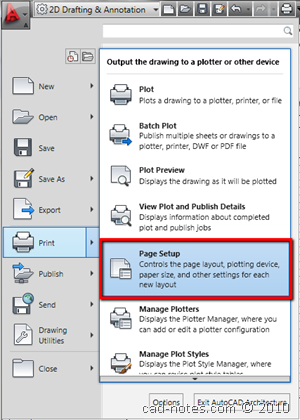
You can define page setups in page setup manager. You can open it from AutoCAD menu> print> page setup. Or you can activate a layout, right click on layout tab and choose page setup manager from contextual menu.
Now you will see the manager dialog box opened. In some AutoCAD default templates, several page setups are already defined. But mostly not yet. We can create a new one by clicking new.
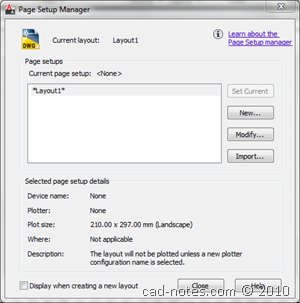
Give it appropriate name. I use A1 dwf. I want to set the paper size to A1 and I want to plot it to dwf printer.
Now I create another one: A3 pdf. I want this one go to pdf printer. You may want to give it a try to your real printer.
Don’t forget to set the AutoCAD layout to use the page setups. You need to open the layout you want to set, then open page setup manager. You should see the layout name in current layout. Below my current AutoCAD layout is Layout3.
Choose which one you want to use, then click set current. You should see the page setup name in the parenthesis.
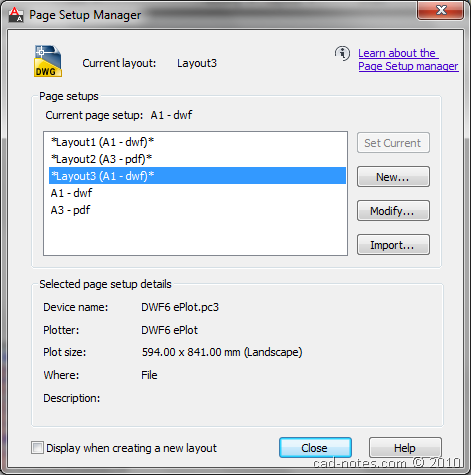
Now you can finish the AutoCAD sheets. Add all information you need before you plot it.
Batch Plot
Now that we have several sheets (well, I only have two) we can try to plot them at once to different printers. Open from AutoCAD menu > publish. Or you can use print> batch plot.
Below, you can see that the model and layouts from my drawing. You can add more layout from other drawings too (you don’t need to open the drawings).

I think it’s very useful if you need to plot many AutoCAD sheets at once, especially if you want to do it to different printers. You probably want to print some AutoCAD drawings to A3 size printer, while the others to A1 plotter.
Below is the report of my batch plot.
Job: – Plotted
Job ID: 1
Sheet set name:
Date and time started: 10/14/2010 2:09:51 PM
Date and time completed: 10/14/2010 2:10:08 PM
UserID: Edwin
Profile ID: AutoCAD
Total sheets: 2
Sheets plotted: 2
Number of errors: 0
Number of warnings: 0
Sheet: batchplot-Layout1 – PlottedFile: C:\Users\Edwin\Documents\batchplot.dwg
Category name:
Page setup: A1 – dwf
Device name: DWF6 ePlot.pc3 – plotted to file
Plot file path: C:\Users\Edwin\documents\batchplot-Layout1.dwf
Paper size: ISO A1 (594.00 x 841.00 MM)
Sheet: batchplot-Layout2 – PlottedFile: C:\Users\Edwin\Documents\batchplot.dwg
Category name:
Page setup: A3 – pdf
Device name: DWG To PDF.pc3 – plotted to file
Plot file path: C:\Users\Edwin\documents\batchplot-Layout2.pdf
Paper size: ISO full bleed A3 (297.00 x 420.00 MM)

Want to try it? Have fun!


I still have difficulties inserting my title block during my plotting, please am looking forward to hearing from you
just got a new job drafting, they print drawings one at a time. Learning about batch plot really scored points plus saved time.
thanks
hai how can I generate 2d views from 3d model for printing purposes and how title blocks are created
how can i give print of this Drawing,these sheets are in model not in layout.
I need help…. I have several DWG files in different sizes that I want to plot on a single HP plotter. The need is that the DWG files should auto adjust itself in order to optimize the paper required from the roll. Is this possible? If so, how?
dear,
in my cad2010 bachplot showing error
**************Job: – Canceled
Job ID: 10
Sheet set name:
Date and time started: 4/27/2011 10:43:42 AM
Date and time completed: 4/27/2011 10:43:44 AM
UserID: mahashooq.alrahman
Profile ID:
Total sheets: 1
Sheets plotted: 1
Number of errors: 1
Number of warnings: 0
Sheet: E011A0813-V30-Model – Plotted with Error(s)
File: D:Tiepco@20082011ORDERE011A0813_TD0979_ 13.8kV_PSS26-04-2011_Rev-3PSS-3, 300KVA,13.8KV-400V,3Ø,60HzE011A0813-V30.dwg
Category name:
Page setup:
Device name: DWG To PDF.pc3 – plotted to file
Plot file path: C:Documents and Settingsmahashooq.alrahmanMy DocumentsE011A0813-V30.pdf
Paper size: ISO expand A4 (210.00 x 297.00 MM)
ERROR: Internal Error: Null Pointer
**************
pleas correct me
thnks in advance
If you plot to other plotter, does the problem still occur? I believe it's the problem with the plotter driver. Read this technical support from Autodesk page: http://usa.autodesk.com/getdoc/id=TS1106909
You can plot the same sheets to multiple plotters in one setup. Add sheets, highlight them, right click, copy sheets, now set the copies to another printer, repeat. One job can go to a plotter, dwf, pdf, etc.
Thank you for the additional great tip Rkent!