Do you have to work with different version of AutoCAD in your company? Or may be you mostly have to send your DWG files in older file format?
You can set to save the files to older AutoCAD, by default.
You can access it in option dialog box, in open and save tab.
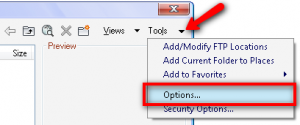
Alternatively, in the save as file dialog box, select tools>options.
You will see a save as options dialog.
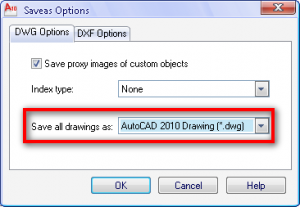
Change the default to the lowest file format the other users can open it. Now you don’t have to worry the others can’t open your AutoCAD files!
You can also consider to ask people who work with your company to use latest DWG TrueView. They can use it to batch convert the file to any version they want.


Hello.Could you please help me/I have installed acad 2010 and after that acad civil 2012. I need acad 2010 to be my default(because I am working in Gavran civill modeler which is compatible with acad 2010, its tools are within)..But every file that I open its starting in acad civil 2012. Is there a way to change this settings_ this would shorten my time a lot.Thanks!
Andrijana,
You need to edit the registry to fix it. Try this solution: http://designandmotion.net/autodesk/mfg-pages/inventor/autodesk-dwg-launcher-wigged-out-fix/