• Home
  • Training Books
  • Subscribe to Our Email Newsletter
  • About
    • Contributors
    • Feedback
    • Contact
    • Privacy policy
    • Cookie Policy

CADnotes

CAD Tutorials and Best Practices for professionals and students

  • Featured
  • AutoCAD
    • AutoLISP
  • Revit
    • Revit Architecture Basic
    • Revit MEP Basic Tutorial
  • Inventor
  • MicroStation
    • MicroStation Basic Tutorial

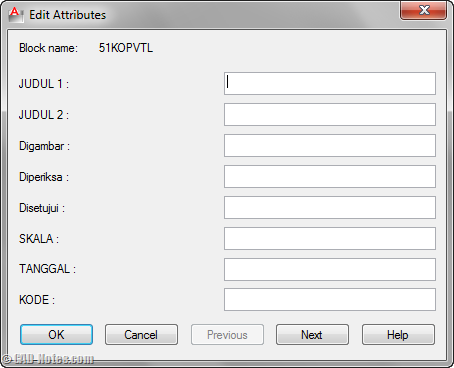
Enable block attribute dialog during insertion

June 8, 2011 by Edwin Prakoso 1 Comment

Do you have blocks with many attributes? Do you ever wish you can input the value easier than typing in command line? See how to do it by changing a system variable.

Featured

best training

The Best, the Rest, the Rare: 100 AutoCAD Tips You Should Know

A compilation of AutoCAD tips. Read all 100 of them to increase your productivity!

Recent Articles

  • The Misconception of CAD to BIM
  • Revit Pattern Alignment
  • Why BIM Dimensions (3D, 4D, 5D) Are No Longer Relevant

Advertisement

New on CADnotes

  • The Misconception of CAD to BIM
  • Revit Pattern Alignment
  • Why BIM Dimensions (3D, 4D, 5D) Are No Longer Relevant
  • Bridge: Controlled Data Sharing Between Stakeholders
  • Autodesk Construction Cloud Evolution

Meet the Authors

avatar for
avatar for
avatar for
avatar for
avatar for
avatar for

Get Connected

CADnotes on FacebookCADnotes on InstagramCADnotes on TwitterCADnotes on YouTube

© 2009 – 2026 CADnotes · Feedback · Privacy Policy · Become an affiliate