• Home
  • Training Books
  • Subscribe to Our Email Newsletter
  • About
    • Contributors
    • Feedback
    • Contact
    • Privacy policy
    • Cookie Policy

CADnotes

CAD Tutorials and Best Practices for professionals and students

  • Featured
  • AutoCAD
    • AutoLISP
  • Revit
    • Revit Architecture Basic
    • Revit MEP Basic Tutorial
  • Inventor
  • MicroStation
    • MicroStation Basic Tutorial

Set default system variables in acaddoc.lsp

January 24, 2012 by Edwin Prakoso 1 Comment

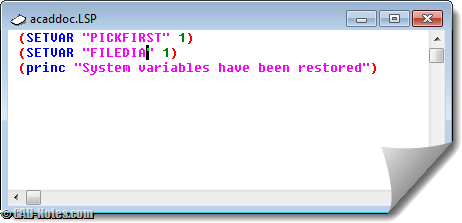
Do you find your system variables change often? Do you have to set it back to default regularly? Why not set them by default in acaddoc.lsp? Read how you can set system variables in acaddoc.lsp. And see some common variables listed here.

Automatically execute command when open/create new file
October 25, 2011 by Edwin Prakoso 4 Comments

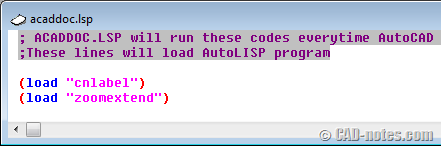
You can use acaddoc.lsp to execute commands when open/create file. Load LISP, define new command, update drawings, etc. Learn how to change how AutoCAD command works!

Featured

6 Reasons Why You Should Pay More Attention to AutoCAD Command Line

AutoCAD Command Line is an essential feature in AutoCAD. It does not just allow you to work faster, but you can find some gems there!

Recent Articles

  • The Evolution of BIM: From 3D Models to Information Management
  • The Misconception of CAD to BIM
  • Revit Pattern Alignment

Advertisement

New on CADnotes

  • The Evolution of BIM: From 3D Models to Information Management
  • The Misconception of CAD to BIM
  • Revit Pattern Alignment
  • Why BIM Dimensions (3D, 4D, 5D) Are No Longer Relevant
  • Bridge: Controlled Data Sharing Between Stakeholders

Meet the Authors

avatar for
avatar for
avatar for
avatar for
avatar for
avatar for

Get Connected

CADnotes on FacebookCADnotes on InstagramCADnotes on TwitterCADnotes on YouTube

© 2009 – 2026 CADnotes · Feedback · Privacy Policy · Become an affiliate