• Home
  • Training Books
  • Subscribe to Our Email Newsletter
  • About
    • Contributors
    • Feedback
    • Contact
    • Privacy policy
    • Cookie Policy

CADnotes

CAD Tutorials and Best Practices for professionals and students

  • Featured
  • AutoCAD
    • AutoLISP
  • Revit
    • Revit Architecture Basic
    • Revit MEP Basic Tutorial
  • Inventor
  • MicroStation
    • MicroStation Basic Tutorial
You are here: Home / AutoCAD / CadTempo: Automatic time tracking tools for CAD users

CadTempo: Automatic time tracking tools for CAD users

September 19, 2012 by Edwin Prakoso 1 Comment

Do you track your AutoCAD users time when they are working on a project? Time tracking is very important for many companies. If you know how long you can finish a typical project, you can comfortably set your project cost. You know when you need to have more people in your design team. Time tracking is important in your business. Like Kelly Totten wrote in ‘Time tracking: necessary and not so evil’.

If you haven’t done it yet, you should at least consider to do it now.

Automatic time tracking for CAD users

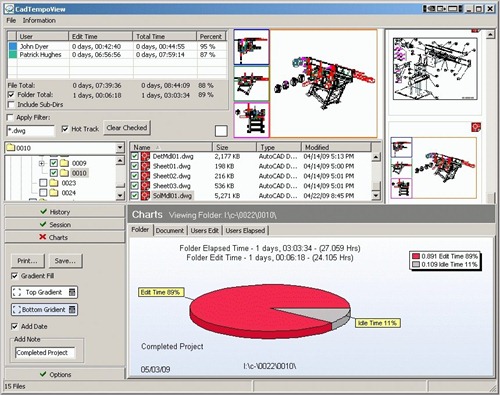
If you are considering to do time tracking for your CAD users, there is a tool that you can use to automate the task: CadTempo. There are many CAD software that it can handle, including AutoCAD, Revit, Inventor, MicroStation, and many more. It even handles Microsoft Word and Excel.

By using this tool, you don’t have to worry and spend time to track time. It will do it automatically. And creating reports is very easy. Just a few clicks away.

There is a comprehensive review in Cadalyst by R.K. McSwain here if you want to know more.
CadTempo04

About Edwin Prakoso

I work as a Sr. Consultant in PT Cipta Satria Informatika. I've been using AutoCAD since R14 and Revit since Revit Building 9. I occasionally write for AUGIWorld magazine and I am also active in Autodesk discussion forum. I'm a member of Autodesk Expert Elite, an appreciation for individuals who give contributions to the Autodesk community.
Connect with me on twitter or LinkedIn.

Filed Under: AutoCAD, MicroStation, Revit Tagged With: autocad tips, CadTempo, time tracking

0 0 votes
Article Rating
Subscribe
Login
Notify of
guest

guest

This site uses Akismet to reduce spam. Learn how your comment data is processed.

1 Comment
Inline Feedbacks
View all comments
Tushar
Tushar
9 years ago

Hi, thank you for this post I was searching for AutoCAD time tracking software from past few days this the best software I got it now. I agree with you that If we know how long you can finish a typical project, you can comfortably set your project cost.

1
Reply
wpdiscuz   wpDiscuz

Featured

8 Frequent Issues when installing Autodesk Products

Many times the installation failed. We need to know what the problem is and what the workaround is. If you don’t know what’s the problem, you may not be able to install it even you have tried several times. Let’s try to fix it!

Recent Articles

  • The Misconception of CAD to BIM
  • Revit Pattern Alignment
  • Why BIM Dimensions (3D, 4D, 5D) Are No Longer Relevant

Advertisement

New on CADnotes

  • The Misconception of CAD to BIM
  • Revit Pattern Alignment
  • Why BIM Dimensions (3D, 4D, 5D) Are No Longer Relevant
  • Bridge: Controlled Data Sharing Between Stakeholders
  • Autodesk Construction Cloud Evolution

Meet the Authors

avatar for
avatar for
avatar for
avatar for
avatar for
avatar for

Get Connected

CADnotes on FacebookCADnotes on InstagramCADnotes on TwitterCADnotes on YouTube

© 2009 – 2026 CADnotes · Feedback · Privacy Policy · Become an affiliate

wpDiscuz