• Home
  • Training Books
  • Subscribe to Our Email Newsletter
  • About
    • Contributors
    • Feedback
    • Contact
    • Privacy policy
    • Cookie Policy

CADnotes

CAD Tutorials and Best Practices for professionals and students

  • Featured
  • AutoCAD
    • AutoLISP
  • Revit
    • Revit Architecture Basic
    • Revit MEP Basic Tutorial
  • Inventor
  • MicroStation
    • MicroStation Basic Tutorial
You are here: Home / AutoCAD / AutoCAD Solid History

AutoCAD Solid History

July 2, 2009 by Edwin Prakoso 2 Comments

Remember in the old days, when we already union or subtract two 3D solid objects, then we no longer able to edit them? Oh yeah, you can create another solid to modify it, then union or subtract them again. Sometimes when the objects become too complex, the only thing you can do is start again from scratch!

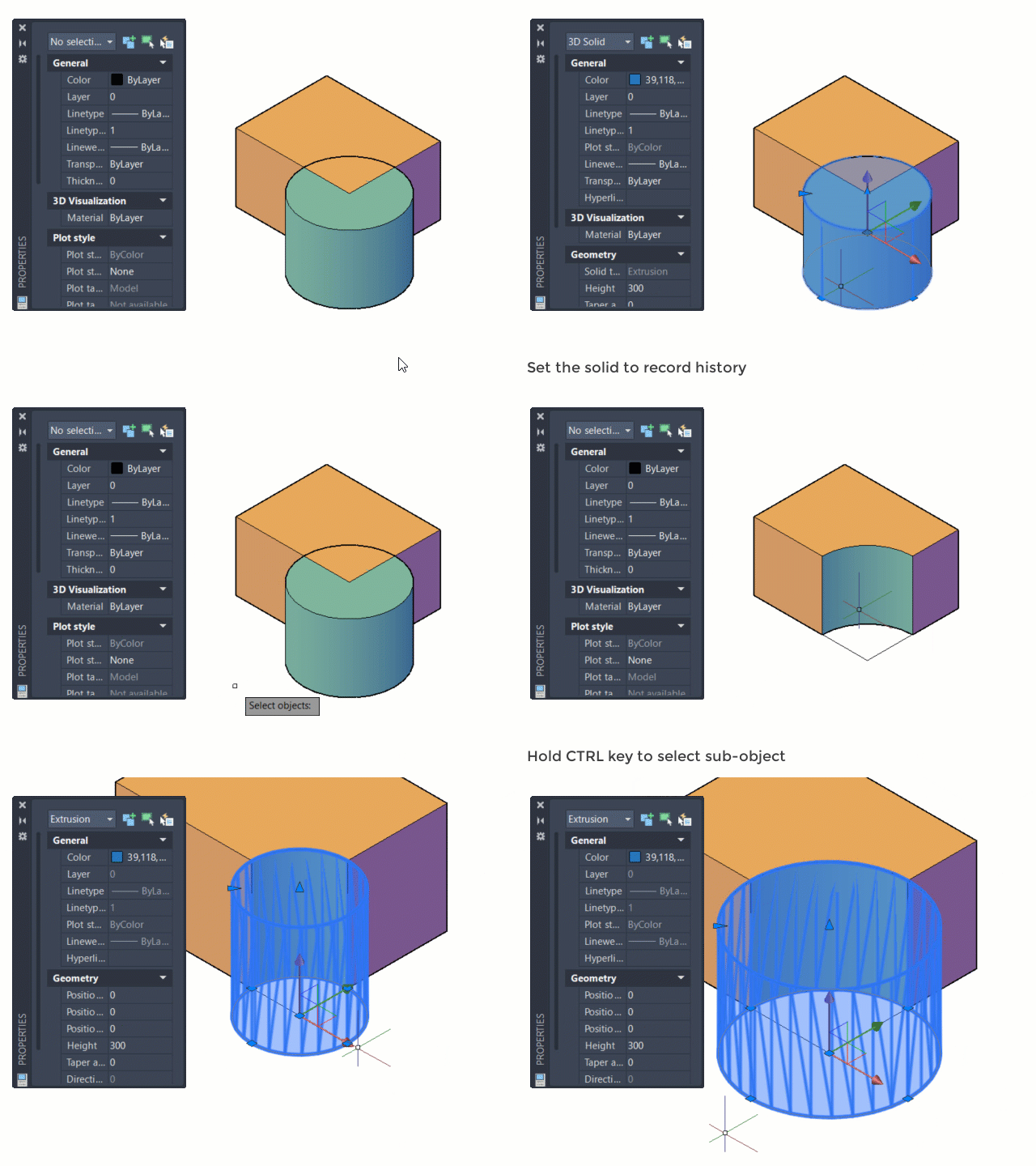
Since AutoCAD 2007, Autodesk introduces ‘solid history’ to AutoCAD 3D modeling. It means that AutoCAD remembers original forms before you did a boolean operation. Those objects treated as subobjects.

This option changes over the year, you need to activate the solid history for the solid that you want to record.

See this illustration below on how it works.
About Edwin Prakoso

I work as a Sr. Consultant in PT Cipta Satria Informatika. I've been using AutoCAD since R14 and Revit since Revit Building 9. I occasionally write for AUGIWorld magazine and I am also active in Autodesk discussion forum. I'm a member of Autodesk Expert Elite, an appreciation for individuals who give contributions to the Autodesk community.
Connect with me on twitter or LinkedIn.

Filed Under: AutoCAD Tagged With: autocad 3D

0 0 votes
Article Rating
Subscribe
Login
Notify of
guest

guest

This site uses Akismet to reduce spam. Learn how your comment data is processed.

2 Comments
Inline Feedbacks
View all comments
m.farsad naeimi
m.farsad naeimi
10 years ago

HI sir. The solid history does not work in my auotocad. plz show me how i can use it. thank you

1
Reply
rahul
rahul
14 years ago

sir plz show autocad history and show what is autocad

0
Reply
wpdiscuz   wpDiscuz

Featured

Engineers in planning meeting

Work Better with AutoCAD | challenge 6: Plan your drawing!

In this Work Better with AutoCAD challenge, Paul Munford shares how to plan your drawing. With good planning, you can complete the drawing effectively!

Recent Articles

  • Why BIM Dimensions (3D, 4D, 5D) Are No Longer Relevant
  • Bridge: Controlled Data Sharing Between Stakeholders
  • Autodesk Construction Cloud Evolution

Advertisement

New on CADnotes

  • Why BIM Dimensions (3D, 4D, 5D) Are No Longer Relevant
  • Bridge: Controlled Data Sharing Between Stakeholders
  • Autodesk Construction Cloud Evolution
  • Autodesk Construction Cloud Activity Log
  • Exporting AutoCAD Plant 3D Model to Navisworks

Meet the Authors

avatar for
avatar for
avatar for
avatar for
avatar for
avatar for

Get Connected

CADnotes on FacebookCADnotes on InstagramCADnotes on TwitterCADnotes on YouTube

© 2009 – 2026 CADnotes · Feedback · Privacy Policy · Become an affiliate

wpDiscuz