In modern construction projects, data ownership and data flow are critical to project delivery. Ideally, all project data should be stored and managed within the project owner’s account to ensure control and long-term data availability throughout the project lifecycle. However, in real-world scenarios, each stakeholder—such as designers, contractors, and subcontractors—needs to collaborate internally before their data is ready to be shared with the owner. Designers, for example, do not want unfinished or unvalidated information to be visible to the owner, and the same applies to other stakeholders.
Internal Collaboration Before Publication
Autodesk Construction Cloud (ACC) allows each stakeholder to work within their own account, enabling internal coordination, design iteration, and quality control without immediately exposing data to the owner. This approach aligns with ISO 19650 principles, where information remains in the Work In Progress (WIP) state until it is formally approved for sharing.
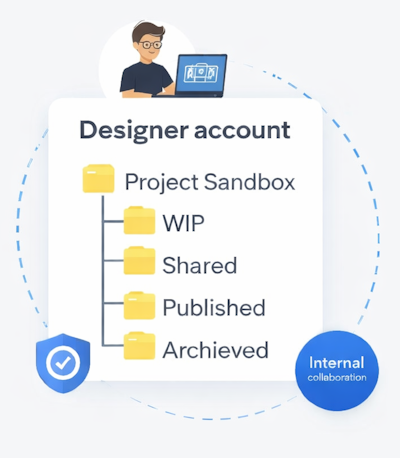
Folder Structure and Data Access
Under ISO 19650, folder access restrictions are not just technical settings. They are part of an information management strategy designed to protect data integrity and reliability. Each folder -such as Work In Progress (WIP), Shared, and Published- serves a specific purpose and has a different access level. The WIP folder is restricted to each organization’s internal team, allowing development, coordination, and revisions to take place without the risk of unvalidated data being used prematurely.
Access is only extended to external parties once the information has passed a formal review and approval process. Data moved to the Published folder is considered to have met the required information standards and is ready to be consumed by others, including the project owner. By controlling access based on information status, ISO 19650 ensures that each stakeholder accesses the right information at the right time, reducing errors caused by the use of unapproved data.
Document Review and Publishing in Autodesk Docs
Autodesk Docs provides a structured document review and approval workflow. Once a file has gone through the review process and is approved, the system automatically:
- Assigns an Approved status to the file (or Rejected if revisions are required)
- Duplicates the approved file into a designated folder – Published, in this case
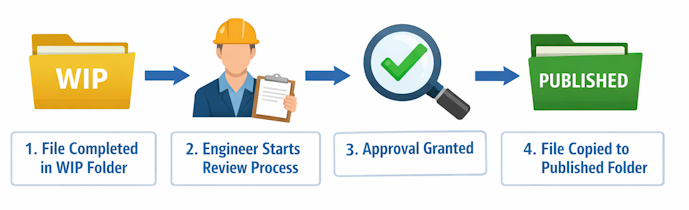
The Published folder then acts as a single source of approved information, ready to be shared with external parties or the project owner.
Bridge: Automating Data Sharing Across Accounts
This is where Bridge plays a key role. Bridge enables automatic synchronization between folders in one ACC account and folders in another ACC account.
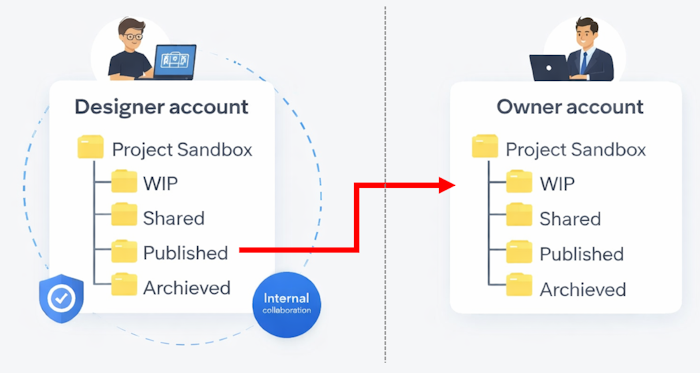
With Bridge configured, approved files in the designer’s Published folder are automatically shared and kept up to date in the target folder within the owner’s account – without any manual uploads or duplicate workflows. This significantly reduces human error and prevents unauthorized data modification.
Bridge ensures that the project owner always receives the latest validated information, while unapproved or work-in-progress data remains protected and isolated.
To Sum Up
By combining the review workflow in Autodesk Docs with Bridge in Autodesk Construction Cloud, collaboration between stakeholders becomes more controlled, efficient, and transparent. Each party can work independently within their internal environment, while the project owner consistently receives accurate, verified, and up-to-date information.
Ultimately, Bridge is more than just a file-sharing feature – it is a critical mechanism for enabling secure, multi-account collaboration in line with BIM best practices.


