Recently Autodesk release Service Pack 2 for AutoCAD 2012. Earlier, a hotfix for Autodesk 360 sync. Service packs and hotfixes are important. It’s strongly recommended for us to keep our products updated. So how can we keep our products updated? Is there any mechanism to update it automatically like Windows update?
Unfortunately no. You must download your updates manually. But how do we know there are service packs and hotfixes released?
How to know that your product is update
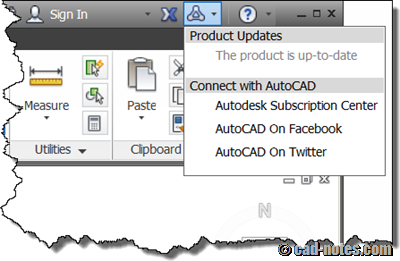
You can check whether your product is up to date or not, by clicking the ‘stay connected’ icon on the right side of application title bar. It will mention if you need to download updates.
In this example below, it says that my product is up to date.
Subscribe to Autodesk news
However, I think the status only mention if you need to install service pack but not hotfixes. Because I didn’t see it mention that I should install the 360 sync hotfix.
So it is a good idea to subscribe to Autodesk news RSS. You can subscribe to their RSS by clicking RSS icon in Autodesk website. If you open autodesk.com, you will see it on every pages at the right bottom. Or you can simply click this link: http://www.autodesk.com/rss.
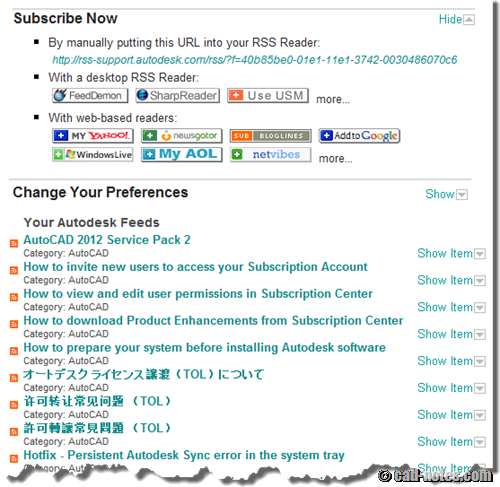
You will see industry related feeds and product support, updates & service packs at the bottom. You can choose the other feeds later, but now let’s just see the product support. Choose which products you want to get the updates, then click create custom feed. If you have AutoCAD and Revit, you can check them both.
This is my custom feed for AutoCAD support. You can see news preview below.
If you are not familiar with RSS readers, you can read about it here. Probably that is the best explanation about RSS and you can use it.
Check the website
Another way to check if there is any update for your application is by directly visiting the support page. You can find every updates and hotfixes for older application. For example, they still provide them for AutoCAD R14!
Go visit the website here: http://usa.autodesk.com/support/downloads/
Which one do you prefer?
I’ll go with RSS feeds. I can’t imagine clicking the stay connected icon every once in a while. I might visit the website to find if there’s a fix for bugs that I found. But subscribing the website is much better because I always use the latest application. Depends on your need.
Now if you decide to subscribe to Autodesk RSS, why don’t you add CAD notes RSS too? You can subscribe here: http://feeds.feedburner.com/CadNotes


Do you need to update to install Service Pack 1 before you install Service Pack 2?
It depends on the SP.
You need to read the readme document before you install it.
The last update for cad 2015 I would like to uninstall because it is crap.
Can you tell be how to do that?
Daniel,
You can uninstall it from Windows add/remove program. Check this article for guidance: https://www.cad-notes.com/how-to-uninstall-updates-or-service-packs/